Claude Code vs Open Source AI Coding Agents — I Tested Them All for 30 Days
I’ve been paying $100/month for Claude Code Max for the better part of a year. That’s $1,200 a year for a terminal-based AI coding agent. And yes — it’s worth every penny when you’re shipping features at 2x speed.
But the open source alternatives have gotten scarily good. OpenCode just crossed 120,000 GitHub stars. Codex CLI went open source with Apache 2.0. Aider has been a quiet powerhouse for years. And Gemini CLI gives you 1,000 free requests per day.
So I spent 30 days testing every major alternative against Claude Code on real projects — refactoring, bug fixes, test writing, cross-file changes, and full feature builds. Here’s what I found.
The Contenders
| Tool | Type | License | Best For |
|---|---|---|---|
| Claude Code | CLI (Anthropic) | Closed source | Best reasoning, polished UX |
| OpenCode | CLI (Go + Bun) | MIT | Model flexibility, zero lock-in |
| Aider | CLI (Python) | Apache 2.0 | Git-first, disciplined workflow |
| Cline | VS Code Extension | Apache 2.0 | IDE safety, controlled edits |
| Codex CLI | CLI (Rust) | Apache 2.0 | ChatGPT ecosystem, parallel agents |
| Gemini CLI | CLI (TypeScript) | Apache 2.0 | Free tier, Google Search grounding |
Round 1: Reasoning & Code Quality
This is where Claude Code has traditionally dominated, and the gap is still real — but it’s shrinking fast.
I gave each agent the same task: “Add pagination, filtering, and sorting to a REST API with 5 related models, including proper TypeScript types and integration tests.”
Claude Code handled it in ~9 minutes. It planned first, created the route handler, the service layer, the types, and 73 tests. The code was clean, consistent with existing patterns, and required zero manual fixes.
OpenCode completed the same task in ~16 minutes — 78% slower — but generated 94 tests instead of 73. More thorough, but took nearly twice as long. It needed one manual fix on a cross-file import.
Aider completed it in ~12 minutes with excellent Git hygiene (every change auto-committed), but needed guidance on the test structure. It’s not designed for autonomous work — it’s a co-pilot, not an autopilot.
Cline took ~14 minutes in VS Code with a safe, structured workflow. The diff views and checkpoint tracking are excellent for code review, but it required more manual prompting to get through all the steps.
Codex CLI (~11 minutes) leveraged GPT-5.3-Codex and handled the task well, but the ecosystem fragmentation (CLI + app + web surfaces) means you need to understand which interface to use when.
Gemini CLI (~13 minutes) surprised me with its Google Search grounding. When I asked it to use a new library pattern, it searched the docs and cited sources inline. But the code quality was noticeably lower — more boilerplate, less elegant abstractions.
Winner: Claude Code. Best reasoning, fastest execution, highest code quality. But OpenCode is closing the gap.
Round 2: Pricing — The Real Story
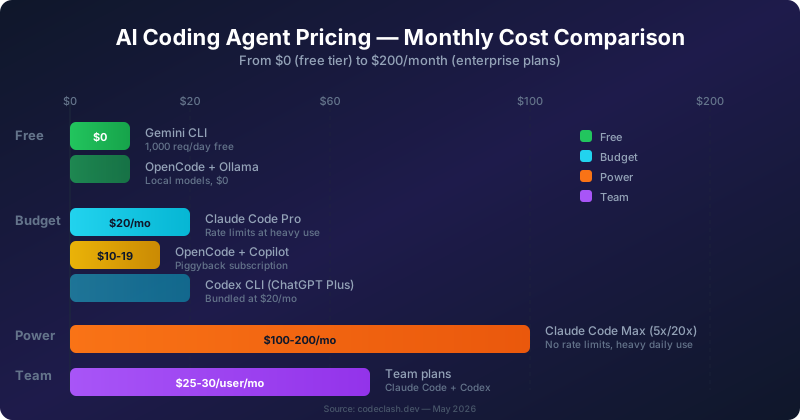
This is where the plot thickens. Claude Code’s pricing is genuinely confusing in 2026.
| Tier | Claude Code | Codex | OpenCode | Gemini CLI |
|---|---|---|---|---|
| Free | ❌ Not available | Go plan ($0, limited) | MIT + BYO keys | 1,000 req/day |
| Entry | Pro: $20/mo | Plus: $20/mo | Zen: pay-as-you-go | Free tier |
| Power | Max 5x: $100/mo | Pro: $200/mo | Black: $200/mo | — |
| Heavy | Max 20x: $200/mo | — | Depends on provider | — |
| API cost | ~$6/day (Sonnet 4.6) | Bundled | Provider cost | Free |
Here’s the reality check:
- OpenCode with Ollama = $0. Run local models, no API calls leave your machine. Quality isn’t Claude-level, but it’s functional for simple tasks.
- OpenCode + GitHub Copilot (~$10-19/mo) lets you piggyback on your existing subscription via
/connect. Zero incremental cost. This is the killer feature nobody talks about. - Gemini CLI = free for most developers. 1,000 requests per day is enough for serious work. The Flash/Pro auto-routing means you get the right model for the right task.
- Claude Code Pro ($20/mo) is great until you hit the rate limits — which happens fast on real projects. That’s why I upgraded to Max at $100/month.
Winner: Gemini CLI for free users. OpenCode for cost flexibility. Claude Code if money isn’t the constraint.
Round 3: Developer Experience
Claude Code — “The Senior Engineer”
Setup takes 3 minutes. You type claude, describe what you want, and it works. The context management with CLAUDE.md is brilliant — you drop project conventions in one file and Claude follows them forever. Subagents let you split work across 2-16 coordinated agents.
Pain points: Rate limits (the #1 complaint). 10-15 second latency on complex queries. Agent Teams consume ~7x more tokens than single-agent mode.
OpenCode — “Freedom & Flexibility”
The terminal UI is arguably the best of any agent. Git-based undo/redo, LSP integration (the LLM can actually see compiler errors), and support for 75+ providers. The client-server architecture means you can connect from TUI, desktop app, VS Code, or HTTP API.
Pain points: 78% slower than Claude Code. Local model tool calling is inconsistent. Higher configuration overhead — you’re tuning a system, not using a product.
Aider — “The Disciplined Git Operator”
Every change is auto-committed. You always have a clean history and easy rollbacks. Built-in loops for testing and linting. If you value transparency and reproducibility above all else, this is your tool.
Pain points: Not autonomous. You drive every step. Doesn’t try to be Claude Code — and that’s by design.
Cline — “The Safe IDE Worker”
VS Code native. Diff previews before every edit. Command approvals. Checkpoint tracking. It’s the most controlled experience if you’re nervous about AI touching your codebase.
Pain points: VS Code only. Performance degrades on large or remote projects. Requires more manual guidance.
Codex CLI — “The ChatGPT Ecosystem Play”
If you’re already in the OpenAI ecosystem, this is seamless. Rust-based, kernel-level sandboxing, parallel agents with Git worktrees. The async cloud delegation means you can fire off a task and come back to a finished PR.
Pain points: GPT-Codex still trails Claude on complex reasoning. Fragmented surfaces (which interface do I use?).
Gemini CLI — “The Free Powerhouse”
Google Search grounding is a game-changer for working with new APIs and libraries. The auto-routing between Flash and Pro models means you rarely think about model selection. 1,000 free requests per day is genuinely generous.
Pain points: Code quality isn’t at Claude’s level. Google ecosystem dependency.
Round 4: Benchmarks — The Numbers Don’t Lie
The benchmark landscape shifted in 2026. OpenAI stopped reporting SWE-bench Verified due to training data contamination, so SWE-bench Pro (private/copyleft repos) is now the credible standard.
SWE-bench Pro (Software Engineering Tasks)
| Agent | Score |
|---|---|
| Opus 4.6 + Claude Code | 57.5% |
| GPT-5.3-Codex + Codex CLI | 57.0% |
| Auggie CLI | 51.8% |
| Claude Opus 4.5 (SWE-Agent) | 45.9% |
Terminal-Bench 2.0
| Agent | Score |
|---|---|
| Gemini 3.1 Pro + Gemini CLI | 53.8% |
| GPT-5.3 Codex | 53.0% |
| Claude Sonnet 4.6 | 53.0% |
| Claude Sonnet 4.5 | 50.0% |
On paper, Claude Code and Codex CLI are neck-and-neck at ~57% on SWE-bench Pro. But benchmarks don’t capture the developer experience — the planning quality, the context retention, the “does it just work” factor.
Common Objections — Let’s Address Them
| Concern | Reality |
|---|---|
| ”Open source means private and secure” | Not automatically. Data handling depends on your model choice, plugin config, and sharing settings. OpenCode + OpenAI API = same privacy as Claude Code. |
| ”Claude Code is too expensive” | For casual use, yes. For daily full-time coding at $100/mo vs. $1,200+/mo on API pay-per-token, the subscription is actually the cheaper option. |
| ”Local models can’t compete” | They can’t match Claude’s reasoning. But for simple refactors, boilerplate generation, and doc writing, Ollama + OpenCode is free and functional. |
| ”Rate limits make Claude unusable” | The Max plan ($100-200/mo) exists specifically for this. If you’re hitting Pro limits, you’re a power user — pay for it or split load with OpenCode. |
| ”AI coding agents will replace developers” | None of these tools write good architecture decisions. They accelerate execution of decisions you make. The senior dev who uses them ships 2x. The junior who relies on them ships broken code 2x faster. |
Decision Matrix — Which One Should You Use?
| Scenario | Recommended Tool | Why |
|---|---|---|
| Solo dev, tight budget | OpenCode + Copilot | Piggyback on existing subscription, zero extra cost |
| Solo dev, best quality | Claude Code Pro ($20/mo) | Unmatched reasoning, 3-minute setup |
| Heavy daily user | Claude Code Max ($100/mo) | Rate limits won’t bottleneck you |
| Privacy-first / local | OpenCode + Ollama | $0, no data leaves your machine |
| VS Code workflow | Cline | Native integration, safe edit previews |
| Git discipline / audit trail | Aider | Every change committed, full history |
| Free tier, enough for most | Gemini CLI | 1,000 req/day, Search grounding built-in |
| Already in OpenAI ecosystem | Codex CLI | Bundled with ChatGPT, parallel agents |
My Honest Verdict
After 30 days of daily use across all six tools, here’s my take:
Claude Code is still the best. It plans cleaner, handles context better, and needs less babysitting than any alternative. If you can afford $100/month and your work justifies it, there’s no reason to switch.
But the alternatives are good enough for most developers. OpenCode is 78% slower but gets you 80% of the way there with zero vendor lock-in. Gemini CLI is free and surprisingly capable for everyday tasks. Aider is the best tool if you value Git discipline over autonomy.
Here’s what I actually do: I use Claude Code Max as my primary agent for complex work. I keep OpenCode configured with my Copilot subscription for quick tasks when Claude is rate-limited. And I use Aider for any work where I need a clean, auditable Git history.
The best setup isn’t one tool. It’s knowing which tool to reach for at which moment.
What’s Next?
The AI coding agent space is moving fast. Expect:
- More open source agents catching up on reasoning quality
- Better local model tool calling (Ollama is improving monthly)
- Hybrid setups where agents orchestrate other agents
- Enterprise tools that combine multiple models per task
I’ll be testing each new release and updating this comparison. Subscribe to the newsletter or follow @codeclashdev for updates.
Found this useful? Buy me a coffee or check out my YouTube channel for video deep-dives on these tools.
Enjoying the content? Here are tools I personally use and recommend:
- 🌐 Hosting: Bluehost — what this blog runs on
- 🛒 Tech Gear: My Amazon Store — keyboards, monitors, dev tools I use
Purchases through my links help keep this blog ad-free 💙
Enjoyed this post?
Subscribe to the newsletter or follow on YouTube for more dev content.
🎬 Watch Shorts