Traefik Middleware Patterns for Production — What Actually Works After 6 Months
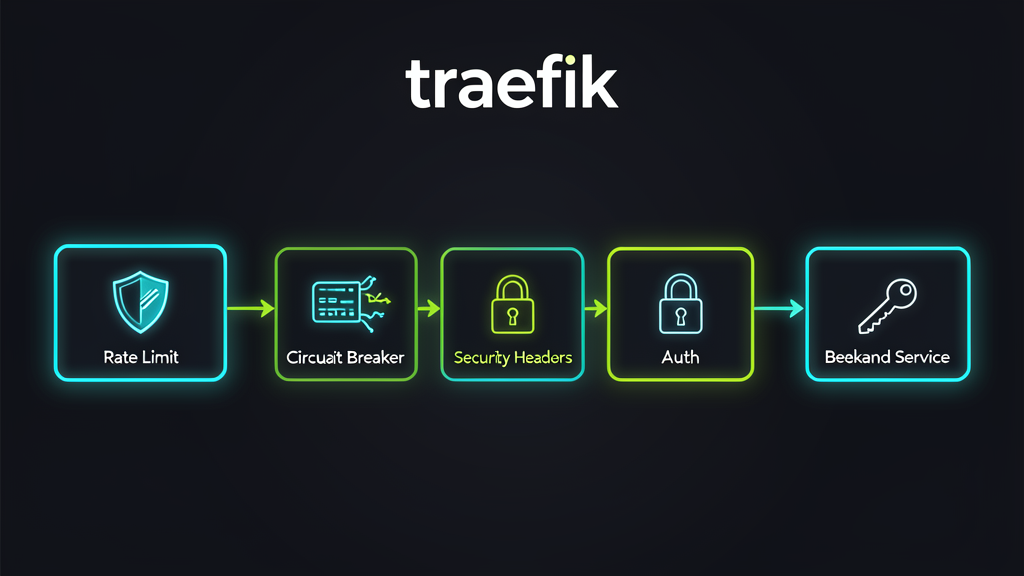
When I migrated from Ingress NGINX to Traefik last month, I treated middlewares like a bonus feature — nice to have, but not essential. Get the routing working, add rate limiting later.
That lasted exactly two weeks. Then a misconfigured API endpoint got hammered by a crawling bot, took down our user service, and I spent a Saturday morning explaining to my team why the staging cluster was eating 80% of our production traffic.
I should have had rate limiting on every route from day one.
What I didn’t expect was how many other middleware patterns I was missing. Traefik’s middleware system is genuinely powerful — but the docs treat each middleware as an isolated feature, and the combinations are where the real production value lives.
After six months of running Traefik across three clusters, here are the middleware patterns that survived contact with reality. With real YAML. And the mistakes I made so you don’t have to.
The Foundation: What Traefik Middleware Actually Is
If you’re coming from Ingress NGINX, middlewares map to what you’d do with annotations and ConfigMap snippets — but instead of pasting raw NGINX config into a YAML file and hoping it works, you declare intent.
# What you want: rate limit this route to 100 req/s
# Not: a 40-line NGINX config block with limit_req_zone directives
Every middleware is a Kubernetes CRD (traefik.io/v1alpha1), attached to a router by name. You chain them, reuse them across routes, and update them without touching the routing logic.
The architecture shift matters: middlewares live on the thing they protect (the service), not on the thing that routes traffic (the router). Traefik v3.7 made this even clearer by allowing middlewares directly on service definitions — no more duplicating auth and rate-limit config across five different IngressRoutes that hit the same backend.
Pattern 1: Rate Limiting — Per-IP, Not Per-Service
The first middleware everyone adds. Also the first one everyone configures wrong.
apiVersion: traefik.io/v1alpha1
kind: Middleware
metadata:
  name: api-rate-limit
  namespace: production
spec:
  rateLimit:
    average: 100
    burst: 200
    period: 1s
    sourceCriterion:
      ipStrategy:
        depth: 1  # Skip the load balancer's IP
The depth: 1 is critical if you’re behind a cloud load balancer. Without it, Traefik sees every request coming from the LB’s IP, and your rate limit becomes a global limit — one aggressive user burns the quota for everyone.
I learned this the hard way when our Cloudflare IP triggered the rate limit for the entire cluster. Forty minutes of 429s before I spotted the missing depth parameter.
What I actually use now — per-route limits based on service criticality:
# Public API: generous limits
apiVersion: traefik.io/v1alpha1
kind: Middleware
metadata:
  name: public-api-rate-limit
  namespace: production
spec:
  rateLimit:
    average: 200
    burst: 400
    sourceCriterion:
      ipStrategy:
        depth: 1

# Internal admin API: strict limits
apiVersion: traefik.io/v1alpha1
kind: Middleware
metadata:
  name: admin-rate-limit
  namespace: production
spec:
  rateLimit:
    average: 30
    burst: 50
    sourceCriterion:
      ipStrategy:
        depth: 1
Then attach them to the right IngressRoutes. The admin API gets stricter limits because it’s not public — there’s no legitimate reason for 200 requests per second to /admin.
When to use: Every public-facing route. Always. Start generous, tighten based on metrics.
Pattern 2: Retry + Circuit Breaker — The Resilience Chain
Retry alone is dangerous. I’ve seen retry storms take down a healthy backend because five failed requests each spawned three retries, creating a 15x amplification.
Circuit breaker alone is wasteful. A single transient 502 trips the circuit, and now every request fails for 10 seconds — including the ones that would have succeeded.
Together, they handle real-world failure modes:
# Retry: handle transient failures (503, connection drops)
apiVersion: traefik.io/v1alpha1
kind: Middleware
metadata:
  name: api-retry
  namespace: production
spec:
  retry:
    attempts: 3
    initialInterval: 100ms

# Circuit breaker: stop the bleeding when things are genuinely broken
apiVersion: traefik.io/v1alpha1
kind: Middleware
metadata:
  name: api-circuit-breaker
  namespace: production
spec:
  circuitBreaker:
    expression: "NetworkErrorRatio() > 0.30"
    checkPeriod: 15s
    fallbackDuration: 30s
    recoveryDuration: 60s
The circuit breaker expression NetworkErrorRatio() > 0.30 means: if more than 30% of requests are failing over the last 60 seconds (the recoveryDuration window), trip the circuit. Then wait 30 seconds (fallbackDuration) before trying again with a probe request.
The key insight: retry handles individual failures. Circuit breaker handles systemic failures. They’re solving different problems.
Traefik v3.7 just made this even better with status-code-driven retries. You can now tell the retry middleware exactly which status codes to retry on:
apiVersion: traefik.io/v1alpha1
kind: Middleware
metadata:
  name: smart-retry
  namespace: production
spec:
  retry:
    attempts: 3
    initialInterval: 100ms
    retryOn:
      statusCodes:
        - 502
        - 503
        - 504
This matters because you don’t want to retry a 500 (internal server error) — the backend is broken, and hammering it won’t help. But a 503 (service unavailable) during a rolling deployment? That’s transient, and retry makes it invisible to users.
When to use: Every stateless API service. Never retry POST/PUT/DELETE without idempotency keys — I’ll cover that in the mistakes section.
Pattern 3: Security Headers — Set Once, Apply Everywhere
If your security headers are configured per-service, you’re doing it wrong. One new microservice, one forgotten annotation, and you’ve got an unprotected route.
apiVersion: traefik.io/v1alpha1
kind: Middleware
metadata:
  name: security-headers
  namespace: production
spec:
  headers:
    frameDeny: true
    contentTypeNosniff: true
    browserXssFilter: true
    stsIncludeSubdomains: true
    stsSeconds: 31536000
    stsPreload: true
    customResponseHeaders:
      X-Robots-Tag: "noindex, nofollow"
      Permissions-Policy: "camera=(), microphone=(), geolocation=()"
      X-Content-Type-Options: "nosniff"
    customRequestHeaders:
      X-Forwarded-Proto: "https"
Then attach this to a Chain middleware and apply it to every route:
apiVersion: traefik.io/v1alpha1
kind: Middleware
metadata:
  name: production-security-chain
  namespace: production
spec:
  chain:
    middlewares:
      - name: security-headers
      - name: api-rate-limit
Apply the chain at the entryPoint level if you want it on everything:
# traefik.yml (static config)
entryPoints:
  websecure:
    address: ":443"
    http:
      middlewares:
        - production-security-chain@kubernetescrd
The test: run your domain through securityheaders.com. If you’re not getting an A, you’re missing something. Our production cluster went from a C (no HSTS preload, missing Permissions-Policy) to an A in one deploy.
When to use: Every HTTPS route. Non-negotiable. If your security team audits you, this is the first thing they check.
Pattern 4: ForwardAuth + IP AllowList — The Internal API Shield
For internal APIs (admin dashboards, metrics endpoints, internal tooling), rate limiting isn’t enough. You need authentication and network-level filtering.
# IP whitelist: only allow traffic from the cluster CIDR
apiVersion: traefik.io/v1alpha1
kind: Middleware
metadata:
  name: internal-ip-allowlist
  namespace: production
spec:
  ipAllowList:
    sourceRange:
      - "10.0.0.0/8"
      - "172.16.0.0/12"

# ForwardAuth: delegate auth to your auth service
apiVersion: traefik.io/v1alpha1
kind: Middleware
metadata:
  name: forward-auth
  namespace: production
spec:
  forwardAuth:
    address: "http://auth-service.auth.svc.cluster.local:8080/validate"
    trustForwardHeader: true
    authResponseHeaders:
      - X-User-Id
      - X-User-Roles
The trustForwardHeader: true is important when your auth service sits behind another proxy. Without it, Traefik strips the forwarded headers and your auth service can’t see the original request details.
The authResponseHeaders list tells Traefik which headers from the auth response to forward to your backend. This is how your API knows who the user is without re-validating the token — the auth service already did that work.
What went wrong for me: I initially forgot to add the auth service’s IP range to the allowlist. Result: every request to internal APIs returned 403 from the IP filter before it even reached ForwardAuth. Took me 45 minutes to realize the allowlist was blocking the auth service itself.
When to use: Admin APIs, metrics endpoints, internal tooling. Anything that shouldn’t be accessible from the public internet.
Pattern 5: Path Rewriting + Compression — The API Gateway Pattern
When you route multiple services through a single domain, path rewriting keeps your backends clean and your URLs consistent.
# Strip the /api prefix before forwarding to the backend
apiVersion: traefik.io/v1alpha1
kind: Middleware
metadata:
  name: api-strip-prefix
  namespace: production
spec:
  stripPrefix:
    prefixes:
      - "/api"

# Compress responses to save bandwidth
apiVersion: traefik.io/v1alpha1
kind: Middleware
metadata:
  name: compress
  namespace: production
spec:
  compress: {}
# IngressRoute tying it together
apiVersion: traefik.io/v1alpha1
kind: IngressRoute
metadata:
name: api-gateway
namespace: production
spec:
entryPoints:
- websecure
routes:
- match: Host(`api.example.com`) && PathPrefix(`/api/v1`)
kind: Rule
middlewares:
- name: api-strip-prefix
- name: compress
services:
- name: api-v1-service
port: 8080
- match: Host(`api.example.com`) && PathPrefix(`/api/v2`)
kind: Rule
middlewares:
- name: api-strip-prefix
- name: compress
services:
- name: api-v2-service
port: 8080The backend receives /users/123 instead of /api/v1/users/123. Your API code doesn’t need to know about the routing layer’s path structure.
Compression on the proxy layer is better than in your app because Traefik handles it once for all backends — your services don’t each need their own gzip/brotli configuration.
When to use: Multi-service API gateways. Any time you’re prefixing routes and want clean backend URLs.
Pattern 6: TraefikService Failover — Blue-Green Without the Service Mesh
Traefik v3.7 introduced the Failover service type, which lets you route traffic to a backup service when the primary fails — no Istio, no Linkerd, just Traefik.
apiVersion: traefik.io/v1alpha1
kind: TraefikService
metadata:
  name: api-failover
  namespace: production
spec:
  failover:
    service:
      name: api-v1
      port: 8080
    fallback:
      name: api-v1-stable
      port: 8080
    healthCheck:
      path: /health
      interval: 5s
      timeout: 2s
    errors:
      status:
        - "500-504"
When api-v1 starts returning 5xx errors or fails its health check, Traefik automatically shifts traffic to api-v1-stable — your last-known-good deployment. No manual intervention. No kubectl exec to switch services.
This replaced our manual rollback process. Before: deployment fails, someone notices alerts, someone runs kubectl set image to roll back. Average recovery time: 12 minutes. After: Traefik detects the failure in 5 seconds, traffic shifts automatically. Recovery time: under 10 seconds.
When to use: Production deployments where downtime costs money. Especially useful when you don’t have (or want) a full service mesh.
Common Mistakes I’ve Made (And Made Expensive)
1. Middleware Order Matters — More Than You Think
Traefik executes middlewares in the order they’re listed. Put compression before auth, and you’re compressing responses for unauthenticated requests — wasting CPU on requests that will be rejected anyway.
Wrong:
middlewares:
  - name: compress       # ← compresses everything
  - name: forward-auth   # ← rejects some, but CPU already spent
Right:
middlewares:
  - name: forward-auth   # ← reject first, save CPU
  - name: compress       # ← only compress responses that will be sent
The rule I follow: filter first, transform last. Auth, IP filtering, and rate limiting go at the top. Compression, header manipulation, and path rewriting go at the bottom.
2. Retrying Non-Idempotent Methods
I configured retry on a POST endpoint for order creation. Three retries. Three duplicate orders. Three angry customers.
# DON'T do this on write endpoints
middlewares:
  - name: retry  # 3 attempts = 3x POST requests
The fix: only apply retry middleware to GET, HEAD, and OPTIONS routes. In Traefik, you separate this with route matching:
routes:
  - match: Host(`api.example.com`) && Method(`GET`, `HEAD`)
    middlewares:
      - name: api-retry
    services:
      - name: api-service
        port: 8080
  - match: Host(`api.example.com`) && Method(`POST`, `PUT`, `DELETE`)
    # No retry middleware
    services:
      - name: api-service
        port: 8080
3. Circuit Breaker Thresholds That Are Too Sensitive
NetworkErrorRatio() > 0.05 — 5% error rate trips the circuit. Sounds conservative, right?
During a normal rolling deployment, 2 out of 10 pods were restarting. That’s 20% errors for about 30 seconds. The circuit breaker tripped, rejected all traffic (including requests to the 8 healthy pods), and our monitoring went nuclear.
What I use now: NetworkErrorRatio() > 0.30 with a 60-second evaluation window. This gives pods time to restart during normal operations without tripping the alarm.
The Middleware Ordering Cheat Sheet
After getting burned enough times, I settled on this ordering for production routes:
| Order | Middleware Type | Why First |
|---|---|---|
| 1 | IP AllowList / BlockList | Drop bad traffic immediately |
| 2 | ForwardAuth / BasicAuth | Reject unauthenticated requests |
| 3 | RateLimit | Prevent abuse of authenticated users |
| 4 | CircuitBreaker | Protect backends from overload |
| 5 | Retry | Handle transient failures |
| 6 | StripPrefix / ReplacePath | Route to correct backend path |
| 7 | Headers / Compress | Transform the response |
Every production IngressRoute in our clusters follows this order. Not because the docs say so — because the wrong order has cost me weekends.
Decision Matrix: Which Patterns Do You Actually Need?
| Your Situation | Patterns to Apply | Skip |
|---|---|---|
| Public API | 1 (Rate Limit), 3 (Security Headers), 5 (Path Rewrite) | 4 (Internal Auth) |
| Internal Admin API | 1 (strict limits), 3, 4 (ForwardAuth + IP) | 6 (Failover) — usually not critical |
| Production API with zero downtime SLA | 1, 2 (Retry+CB), 3, 6 (Failover) | — |
| Multi-version API gateway | 1, 3, 5 (Path Rewrite) | 4, 6 |
| Staging / Dev | 3 (Security Headers) | Everything else — keep it simple |
If you’re running a single service with no public API, start with Pattern 3 (security headers) and Pattern 1 (rate limiting). That’s your baseline. Add the others as your architecture grows.
What’s Next
The migration from Ingress NGINX to Traefik got you the routing. These middleware patterns give you the production readiness.
If you haven’t done the migration yet, read my step-by-step guide — 47 Ingress resources across three clusters, with the gotchas I hit along the way.
And if you’re still on Docker Compose for production, these Kubernetes patterns are the natural next step — including how to carry your middleware concepts over to Deployment-level configuration.
Related Articles on This Blog
- Ingress NGINX Is Retiring — Why I Switched to Traefik — The migration guide: 6 steps, real YAML, and what went wrong
- Docker Compose → Kubernetes in Production — 6 essential patterns when you outgrow Docker Compose
- CI/CD Pipeline Patterns — 5 reusable GitHub Actions patterns for Traefik deployments
Enjoying the content? Here are tools I personally use and recommend:
- 🌐 Hosting: Bluehost — what this blog runs on
- 🛒 Tech Gear: My Amazon Store — keyboards, monitors, dev tools I use
Purchases through my links help keep this blog ad-free 💙
Enjoyed this post?
Subscribe to the newsletter or follow on YouTube for more dev content.
🎬 Watch Shorts