What 1 Year of AI Coding Assistants Taught Me About Developer Productivity — After the Hype
I’ll admit something uncomfortable: when I wrote my first article on AI coding assistants back in April 2025, I was optimistic about where this was heading. I said AI assistants were “great for boilerplate, terrible for critical code.” That still holds — but the gap between those two extremes has gotten messier, not cleaner.
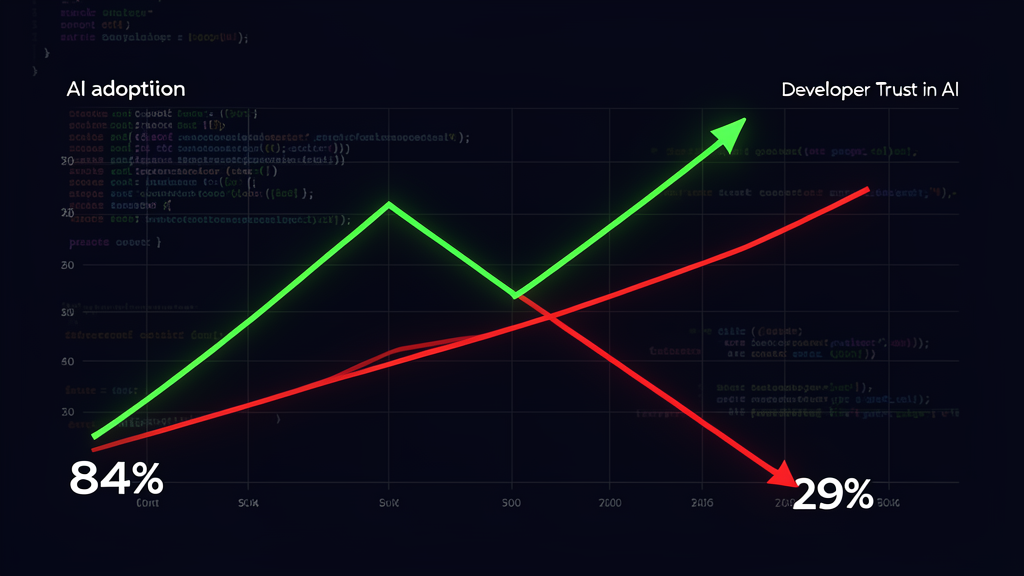
Fast forward to today. 84% of developers now use or plan to use AI coding tools — up from 76% last year, according to Stack Overflow’s 2025 survey. Yet trust in AI accuracy fell to 29% — down from 40%. More developers actively distrust AI output (46%) than trust it (33%).
That’s not a contradiction. That’s a maturity curve. And after spending a full year shipping production code with Claude Code, Cursor, GitHub Copilot, and Windsurf across Java, Python, and TypeScript projects, I have a much more nuanced take than my original “boilerplate only” hot take.
Here’s what actually works, what’s still theater, and where the “vibe coding” movement went off the rails.
The Paradox: Usage Up, Trust Down
Let’s start with the data, because it tells the real story:
| Metric | 2024 | 2025 | Change |
|---|---|---|---|
| AI adoption | 76% | 84% | +8% |
| Trust in AI accuracy | 40% | 29% | -11% |
| Positive favorability | 72% | 60% | -12% |
| Daily AI use | ~30% | 47.1% | +17% |
Source: Stack Overflow 2025 Developer Survey (49,009 respondents)
This is the opposite relationship we usually see with new technology. Normally, adoption and trust converge over time. Here, they’re diverging. Developers are using AI more because they’ve seen its limits, not despite them.
The #1 frustration (66% of respondents): “AI solutions that are almost right, but not quite.” That “almost right” is the killer — it’s worse than obviously wrong code because it compiles, passes basic tests, and looks plausible until it doesn’t.
I’ve felt this. More times than I’d like to admit, I’ve accepted AI-generated code that had a subtle boundary condition error or used the wrong constant. The 45.2% of developers who report debugging AI code takes more time than writing it themselves? Yeah, I’m in that group.
The Four Tools I Actually Used
My original article covered AI assistants generically. This time, I tested the big four for a full year across real projects: a Spring Boot API migration, a FastAPI + SQLModel backend, and a TypeScript 7 monorepo. Here’s the honest breakdown.
Claude Code: The Terminal Agent That Changes How You Delegate
Anthropic’s Claude Code runs in your terminal and does something no other tool quite replicates: it reads your entire codebase, plans multi-step changes, executes them, and iterates until they work. It stages, commits, and even writes pull requests.
Where it excelled:
- Large-scale refactoring. I had Claude Code rename a domain model across 47 files in a Spring Boot project. It updated imports, JPA queries, test fixtures, and even the OpenAPI spec. Took 4 minutes. Would’ve taken me 2 hours.
- Infrastructure boilerplate. Writing Docker Compose health checks, Kubernetes probes, CI/CD pipeline stages — Claude Code nails these because they’re pattern-heavy and well-documented in its training data.
- Codebase-wide reasoning. The “read the whole project” capability is real. Unlike Copilot’s extension model that struggles on 100K+ file repos, Claude Code indexes everything.
Where it disappointed:
- The “almost right” problem hits hard here. When Claude Code gets a refactoring 95% right, the remaining 5% (a missed edge case, a wrong import path) can take 30 minutes to track down because you’re reviewing diffs, not writing code.
- Enterprise pricing is usage-based. The subscription caps your monthly spend, but heavy refactoring days consume tokens fast. I once burned through a week’s worth of tokens on a single complex migration. The $100 Max tier gives you a cap, but you need to monitor usage.
- Terminal-first feels raw for some tasks. For UI work or visual debugging, I still reach for an IDE. Claude Code is a backend/middleware specialist.
My cost: $100/month (Max tier). Worth it for the refactoring time savings alone, but I learned to scope tasks carefully.
Cursor: The AI-Native IDE That Actually Works
Cursor is a VS Code fork with AI baked into every layer — not bolted on as a plugin. The Composer feature handles multi-file edits, and the Memories system learns your project’s patterns over time.
Where it excelled:
- Daily editing workflow. Cursor’s Tab autocomplete is the best I’ve used. It reads your current file context, nearby files, and recent changes to suggest the next line. The acceptance rate on my TypeScript project was around 40% — I kept almost half of its suggestions.
- Model flexibility. Switching between Claude Sonnet, GPT-4o, and Gemini per task is genuinely useful. Claude for complex logic, GPT for boilerplate, Gemini for quick explanations.
- Background agents (Bug Bot). I’d leave a failing test suite for Cursor to fix overnight and review the diff in the morning. This async workflow changed my morning routine.
Where it disappointed:
- IDE migration tax. Moving your entire workflow — keybindings, extensions, terminal setup — to a fork of VS Code is a real commitment. Some extensions don’t work. The VS Code with Vim extension I rely on worked, but with quirks.
- $40/seat for teams is steep. At that price, it needs to replace multiple tools. For solo devs at $20/month, it’s reasonable.
- Memories can learn the wrong patterns. Early in my FastAPI project, Cursor learned my (admittedly bad) habit of inline SQL string concatenation. It took a week of correcting it before the pattern shifted.
My cost: $20/month (Pro). I used it daily for 8+ hours. Best ROI of any tool for editing velocity.
GitHub Copilot: The Platform Play That Everyone Already Has
Copilot is the most widely distributed AI coding tool for a reason: it’s integrated into VS Code, JetBrains, Neovim, and even Xcode. If your org is on GitHub, it’s probably already provisioned.
Where it excelled:
- Model flexibility at the platform level. GPT-5.x, Claude 4.x, Gemini 3.x, xAI Grok — Copilot lets you pick the model per workspace. This is the only tool that lets you hedge your bets on AI vendors.
- Free tier is genuinely useful. 2,000 completions and 50 agent requests per month got me through lighter weeks. No other tool offers this.
- GitHub ecosystem integration. Copilot Workspace (issue → code → PR pipeline) is the most cohesive AI workflow for GitHub-centric teams. The PR summary feature alone saves 10 minutes per PR.
Where it disappointed:
- Codebase context degrades on large repos. On our 14-package TypeScript monorepo, Copilot frequently lost track of imports from sibling packages. This is a fundamental limitation of the extension architecture vs. a native index.
- $0.04/request overages add up fast. Our Pro+ tier ($39/month) gave us 1,500 premium requests. On heavy refactoring days, we blew through that by 2 PM. At $0.04 per extra request, a busy week cost us $40-60 in overages.
- Slack integration gap. Unlike Claude Code, Copilot can’t receive coding tasks from Slack. For async team workflows, this is a real gap.
My cost: $39/month (Pro+) for the team. We used it as the baseline, supplemented with Claude Code for heavy refactoring.
Windsurf: The Cascade Agent That Promised Autonomy
Windsurf (formerly Codeium) positions itself as the autonomous coding tool. Its Cascade feature attempts to handle entire features end-to-end.
Where it excelled:
- Rapid prototyping. For greenfield projects, Cascade can scaffold an entire feature in minutes. I built a FastAPI CRUD endpoint with models, routes, and tests in about 5 minutes of prompts.
- $15/month price point. At less than Cursor and Claude Code, it’s the most affordable option.
- Good for small fixes. Typos, variable renames, simple bug patches — Cascade handles these reliably.
Where it disappointed:
- Autonomy is the problem, not the feature. Cascade tries to do too much without enough guardrails. On one occasion, it rewrote our database migration strategy because it “understood” our schema differently than we intended. The rollback took longer than the original feature.
- Context window limitations. Compared to Cursor’s 200K tokens, Windsurf struggles on larger codebases. It loses track of cross-module dependencies.
- Still maturing. The product feels 6-12 months behind Cursor in polish. Extension compatibility, terminal integration, and team features all lag.
- Local/self-hosted is the missing piece. For teams with data sovereignty requirements, tools like Continue.dev (which works with Ollama and local models) address the 81% of developers concerned about AI data privacy. This is a growing segment the big three haven’t fully addressed.
My cost: $15/month (Pro). Used occasionally for prototyping. Not worth keeping as a daily driver.
The “Vibe Coding” Backlash Is Real — And It Should Be
Somewhere in late 2025, “vibe coding” went from a joke to a development paradigm. The idea: describe what you want in plain language, let AI generate the code, don’t worry about the details. Google Trends showed a 2,400% increase in searches since January 2025.
Here’s my take: vibe coding is the cargo cult of AI-assisted development.
The Stack Overflow data backs this up. 87% of developers are concerned about AI agent accuracy. 81% worry about security and data privacy. Only 14.1% use AI agents daily at work. 37.9% don’t plan to use them at all.
When I see people building production apps without understanding the code AI generated, I don’t see the future of development — I see a mountain of technical debt waiting for a rainy day.
That said, there’s a healthy middle ground between “vibe coding everything” and “never touch AI tools.” It looks like this:
| Task Type | AI Role | Human Role |
|---|---|---|
| Boilerplate (CRUD, scaffolding) | Generate 80-90% | Review, integrate, test |
| Refactoring (renames, extraction) | Execute with supervision | Define scope, verify diffs |
| Debugging (stack traces, logs) | Suggest hypotheses | Validate, implement fix |
| Architecture (design patterns) | Discuss trade-offs | Make final decisions |
| Security-critical code | Don’t use AI | Write from scratch |
The developers who get the most value from AI tools are the ones who treat them as fast, fallible collaborators — not oracles.
Where I Actually Use Each Tool in 2026
After a year of experimentation, here’s my real daily workflow:
Cursor ($20/mo) — My primary IDE for 6-8 hours of daily editing. The autocomplete, model switching, and Memories system make it the best editing experience I’ve had. This is where I write the code I actually care about — business logic, complex algorithms, anything that needs my full attention.
Claude Code ($100/mo) — My refactoring engine. I fire it up for tasks that span multiple files or modules: renaming domain objects, extracting services, updating API contracts across a monorepo. I run it in my terminal while editing other files in Cursor. The combination is powerful.
GitHub Copilot ($39/mo Pro+) — My team’s baseline. Everyone on the team has it. It handles the daily autocomplete, PR summaries, and quick chat queries. It’s not the best at any single thing, but it’s good enough at everything and has the lowest friction for team-wide adoption.
Windsurf ($15/mo) — I keep it for rapid prototyping. When I want to explore a new API design or scaffold a greenfield feature quickly, Cascade is handy. But I never let it touch production code without a full review.
Total cost: $174/month. Is that a lot? For a senior developer whose time costs $80-120/hour, these tools save me roughly 15-20 hours per month. The math works.
What I Got Wrong Last Time
My original AI coding assistants article had a few blind spots that a year of production use exposed:
1. I underestimated the multi-tool reality. I assumed developers would pick one tool and stick with it. In reality, the most productive teams run 2-3 tools in parallel. Our setup (Cursor + Claude Code + Copilot) cost $159/month but saved far more than any single tool could.
2. I overestimated autonomy. I thought agentic coding (AI running tasks independently) would mature faster than it has. The reality: supervised AI (you guide, it executes) is where the real value is today. Full autonomy still produces too many “almost right” errors.
3. I underestimated the trust gap. I didn’t foresee that adoption and trust would diverge. The fact that 84% of developers use AI while only 29% trust it tells us the industry is in an awkward adolescence — we’ve outgrown the hype phase but haven’t reached the maturity phase.
4. I should have been more specific about which tasks are safe. “Great for boilerplate” is too vague. The reality: CRUD endpoints, test scaffolding, CI/CD config, and documentation are genuinely safe. Database migrations, security logic, and cross-cutting concerns need human oversight.
The Decision Matrix
If you’re trying to decide which tool to invest in, here’s my honest take — no vendor lock-in, no hype:
| Your Situation | Recommended Tool | Why |
|---|---|---|
| Solo developer, daily editing | Cursor Pro ($20/mo) | Best editing experience, model flexibility, memories system |
| Large refactoring / codebase changes | Claude Code Max ($100/mo) | Full codebase reasoning, autonomous multi-file editing |
| Team on GitHub, budget-conscious | Copilot Pro ($10/mo) or Pro+ ($39/mo) | Broadest IDE support, free tier, GitHub integration |
| Rapid prototyping / MVPs | Windsurf Pro ($15/mo) | Fastest scaffolding, lowest cost for exploration |
| Enterprise, compliance required | Copilot Enterprise or Claude Code | SAML SSO, audit logs, policy controls, HIPAA readiness |
| Want the most productivity | Cursor + Claude Code (~$120/mo) | Best editing + best refactoring = maximum time savings |
The “most productivity” option isn’t the cheapest, but it’s the one I’d recommend to any senior developer who ships code daily. The editing velocity from Cursor combined with the refactoring power of Claude Code is genuinely transformative.
What I’d Do Differently Starting Out
If I could go back to April 2025 with what I know now:
1. Start with Cursor, not Copilot. Copilot was the easy choice because I already had it. But Cursor’s AI-native architecture provides a fundamentally better experience for daily coding work. The learning curve of switching editors pays off within a week.
2. Use Claude Code for refactoring from day one. I waited 6 months to try Claude Code because I assumed it was just another chat interface. It’s not. It’s a codebase-scale reasoning engine. The time I wasted doing manual refactoring before discovering it is embarrassing.
3. Set token budgets immediately. I burned through $200 in Claude Code tokens in my first two weeks because I didn’t understand the usage model. Set limits, monitor consumption, and scope tasks before you hit send.
4. Don’t trust AI with production database migrations. I learned this the hard way when an AI-generated migration dropped a constraint it shouldn’t have. The rollback was painful. Rule #1: AI can write the migration. You review and execute it.
The Honest Bottom Line
AI coding assistants in 2026 are like a talented junior developer who types fast, makes confident mistakes, and needs careful supervision. They’re incredibly useful — I wouldn’t go back to coding without them. But they’re not replacing senior engineers, and the people claiming otherwise are either selling something or haven’t shipped production code with AI yet.
The “vibe coding” movement was always going to hit a wall. You can’t vibe your way through a race condition, a distributed deadlock, or a subtle off-by-one error in pagination logic. The developers who succeed with AI tools are the ones who bring stronger judgment, not weaker — because you need more expertise to evaluate AI output than to write it yourself.
That’s the irony nobody talks about: AI coding tools amplify whatever judgment you already have. Senior devs who know what good code looks like move faster. Junior devs who can’t yet spot subtle bugs need closer supervision — not less. The trust gap isn’t a bug — it’s a feature. It means the industry is developing the skepticism it needs to use these tools responsibly.
My recommendation? Pick the tool that matches your workflow, set realistic expectations, and never, ever deploy code you don’t understand. The AI will suggest it. You still have to own it.
Related Articles on CodeClashDev
Continue Reading
- → TypeScript 7 Rewrote Its Compiler in Go — And It's 10x Faster
- → Why I Stopped Using ESLint for TypeScript — And Started Using Biome
- → TypeScript 7 in Monorepos: What I Learned Setting Up tsgo
- → Spring AI + RAG in Production: Structured Output, Ollama, and pgvector
- → Rust + Go Hybrid Architectures: What 6 Months Taught Me
Enjoying the content? Here are tools I personally use and recommend:
- 🌐 Hosting: Bluehost — what this blog runs on
- 🛒 Tech Gear: My Amazon Store — keyboards, monitors, dev tools I use
Purchases through my links help keep this blog ad-free 💙
Enjoyed this post?
Subscribe to the newsletter or follow on YouTube for more dev content.
🎬 Watch Shorts